To crop an image to a specific ratio you need the largest rectangle of that shape that fits inside the picture, and there are only two cases. Compare your image's ratio (width divided by height) against the target. If your image is the wider of the two, keep the full height and cut the sides. If it is the taller, keep the full width and cut the top and bottom. Everything after that is deciding which part you are willing to lose, which is a judgement about the photograph rather than arithmetic.
Work out the crop rectangle
Write the target as a decimal by dividing the two numbers. 16:9 is 1.7778, 3:2 is 1.5, 1:1 is 1, 4:5 is 0.8, 9:16 is 0.5625. Do the same for your image. Then:
- Image ratio is larger than the target: your picture is too wide. New width = height × target ratio. Height stays as it is. For a centred crop, the left edge sits at (original width − new width) ÷ 2.
- Image ratio is smaller than the target: your picture is too tall. New height = width ÷ target ratio. Width stays as it is. The top edge sits at (original height − new height) ÷ 2.
Those four numbers (left, top, width, height) are the crop. Every cropping tool worth using takes them in that form.
Two worked examples
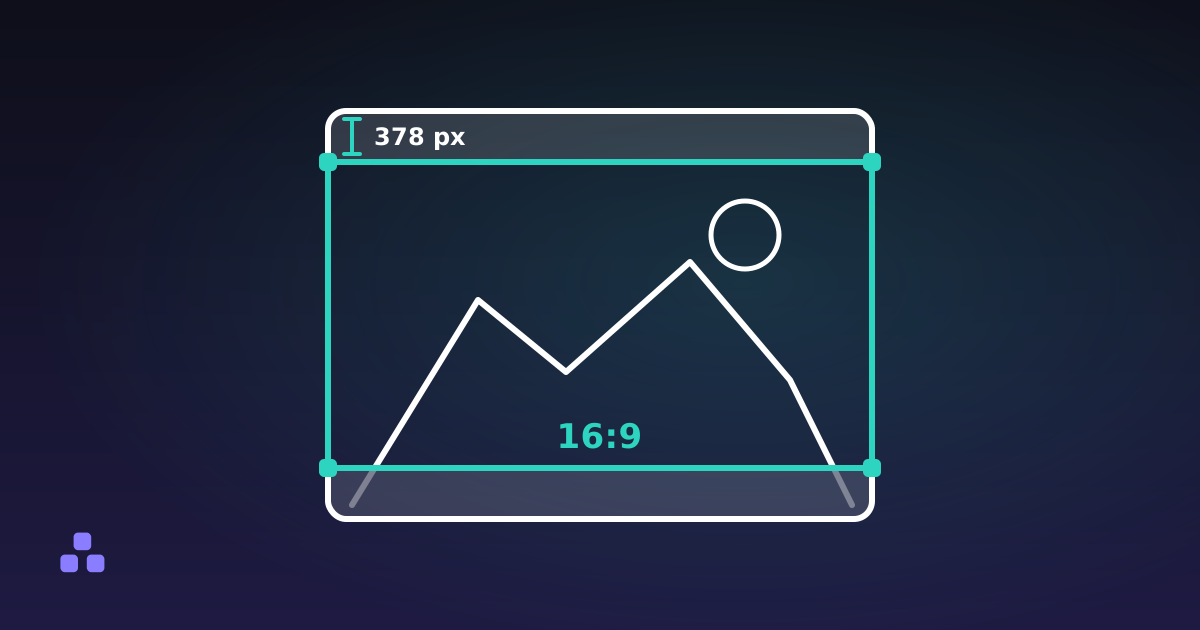
A 4032 × 3024 phone photo, which is 4:3 or 1.3333, going to 16:9. The photo's ratio is smaller, so it is too tall: the width stays at 4032 and the new height is 4032 ÷ 1.7778, which is 2268. The difference is 756 px, so a centred crop starts 378 px down and the rectangle is 0, 378, 4032, 2268. That costs a quarter of the height and takes the file from 12.2 to 9.1 megapixels.
A 6000 × 4000 camera file, 3:2, going to a square. Its ratio of 1.5 is larger than 1, so it is too wide: the height stays at 4000, the new width is also 4000, and a centred crop starts 1000 px in from the left. A third of the frame goes, all of it from the sides, and 24 megapixels become 16.
Which part do you cut?
The formula gives you the shape. It has no opinion about the horizon sitting a third of the way up, or the subject standing near the left edge, and centred is the default precisely because it is the choice that requires no thought. Centred is often the wrong one.
This is the point where you want to see the result before committing to it. Clicking a ratio in the browser-based image cropper here locks the selection to that shape: drag it and it moves, drag a corner and it scales, but it cannot change proportions. The four number fields below the preview update as you drag and accept typed values, so you can nudge a locked 16:9 box to exactly y = 378 rather than approximately there. With the preview focused, the arrow keys move the box ten pixels at a time, or one pixel with alt held.
Two honest limits. The preview is scaled down to fit your screen, so the pixel fields are the truth and the box on screen is an approximation of them. If the rectangle has to be exact, type it. And there is no rotation or straightening, so a crooked horizon stays crooked.
The ratios you will be asked for
| Ratio | Decimal | Where it turns up |
|---|---|---|
| 1:1 | 1.0 | Avatars, app icons, product grids, anything shown in a round mask |
| 4:5 | 0.8 | The tallest portrait most feeds will display without cropping it again |
| 3:2 | 1.5 | What most cameras shoot; the shape of a 6 × 4 inch print |
| 4:3 | 1.3333 | Phone sensors at full resolution, tablets, older monitors |
| 16:9 | 1.7778 | Video and video thumbnails; 1280 × 720 and 1920 × 1080 |
| 9:16 | 0.5625 | Vertical video and full-screen stories |
| 1.91:1 | 1.9048 | Link preview cards; 1200 × 630 |
That last row is a trap worth knowing about. 1.91:1 is a rounded label for 1200:630, which reduces to 40:21 and works out to 1.90476. Crop a 1200 px wide image against a literal 1.91 and you get a height of 628, not 630: two pixels of background down the bottom edge of a card that was supposed to fill the space. The preset in the cropper uses the exact value, and so should you if you are doing it by hand.
Crop first, then resize
A ratio is a shape, not a size. Cropping to 16:9 tells you nothing about whether the result is 1920 px wide or 480, and the distinction catches people out often enough that it is worth reading what aspect ratio does and does not tell you before building a set of banner sizes around it.
When you need both a shape and an exact pixel size, do them in that order: crop to the proportions, then resize to the numbers. Going the other way means either cropping twice or resampling twice, and every resample softens the picture a little more. Cropping first also means the resize is a single clean division: a 4032 × 2268 crop down to 1920 × 1080 is exactly 2.1× on both axes, with no rounding to argue about.
What a crop costs
Resolution, quadratically. Halve the width and the height and a quarter of the pixels remain. That is usually fine, since a full-width web image rarely needs more than 2 megapixels, but watch the long side. Above roughly 1600 px it will look right anywhere on a screen. Below about 800 you will start to see it.
A generation of JPEG. A browser has to decode the file to raw pixels, cut the rectangle and encode a fresh JPEG, so the pixels you kept come out very slightly worse than they went in. Command line tools such as jpegtran can crop a JPEG losslessly by copying its compressed blocks untouched, but only on a block boundary (8 or 16 pixels depending on the file) and a browser has no access to those blocks. The cropper here defaults to quality 92 instead of the usual 85 to keep that second generation close. PNG and lossless WebP have no such problem.
Everything the file knew about itself. The output is a new file, which means no EXIF: no camera model, no timestamp, no GPS coordinates, no embedded colour profile, no copyright field. Mostly that is a feature, since the metadata inside a photo says more than most people expect, but it is a surprise if you needed the attribution tag to survive.
When cropping is the wrong answer
If the source and the target are far apart, the crop stops being a trim and starts being a different photograph. A 1080 × 1920 vertical shot cut to a 1.91:1 link card leaves a 1080 × 567 strip: under 30% of the picture, and whichever 30% you choose, the composition the photographer intended is gone.
At that point the better move is usually to pad rather than crop: put the whole image on a canvas of the target shape and accept the bars. That is a different operation and this cropper does not do it. The other option is to shoot or source the image at something closer to the shape you need, which is only useful advice before the fact, but it is the reason photographers frame a little loose when they know the picture has to work in three places.
The quickest path through all of this is to open the image cropper, click the ratio you need, and drag the locked box until the composition looks right. Its summary line gives you the final pixel dimensions and the reduced ratio, so you can check the arithmetic came out where you expected. The image is decoded and re-encoded in your browser and never sent anywhere.
If the square you are cutting is destined to be a site icon, the crop is the easy half. Favicon sizes covers which dimensions browsers and phones actually ask for, and why one 512 px square is not the whole answer.
Frequently asked questions
How do I crop an image to 16:9?
Divide 16 by 9 to get 1.7778, then compare it to your image ratio. If the image is taller than that, keep the full width and set the height to width divided by 1.7778; if it is wider, keep the full height and set the width to height times 1.7778. A 4032 by 3024 photo becomes 4032 by 2268, starting 378 pixels down for a centred crop.
How do I crop an image to an exact pixel size?
Crop to the right shape first, then resize to the numbers. Doing it in that order means one resample instead of two, and the resize becomes a simple scale on both axes. Cropping straight to a small pixel size throws away resolution you might have wanted.
How much of the image do I lose going from 4:3 to 16:9?
A quarter of the height, and none of the width. A 4032 by 3024 frame keeps 2268 pixels of height, so 756 pixels disappear, split as 378 top and bottom if you centre the crop. In pixel count that is 12.2 megapixels down to 9.1.
What size should I crop an image for a link preview?
1200 by 630 pixels, which is the 1.91:1 shape. Use the exact ratio of 1.904762 rather than 1.91, because the rounded figure gives a height of 628 and leaves a two-pixel gap. Keep any text on it large, since previews are often rendered at a third of their size.
Does cropping an image reduce its quality?
For a JPEG, slightly: the file is decoded and re-encoded, and that second encode is lossy. At a quality setting in the low nineties the difference is very hard to see. PNG and lossless WebP are unaffected, because nothing is discarded when they are written.
Can I crop a photo without uploading it anywhere?
Yes. A browser can read the file, draw it to a canvas and encode the cropped result locally, with no request carrying the image off your device. The cropper on this site works that way, and you can confirm it in the Network tab of your developer tools.
Last updated September 19, 2026